
Deskripsi
Panduan
How to top-up PUBG Mobile UC?
- Select the Unknown Cash UC denomination.
- Enter your PUBG Mobile Player ID.
- Check out and select your payment method.
- Once payment made, the PUBG Mobile UC you purchased will be credited to your PUBG Mobile Account shortly.
Important Information:
- Only Player ID required for PUBG Mobile UC top-up.
- You may stay logged in throughout the transaction, once the top-up is completed, you will receive the UC in your PUBG Mobile account.
- Please enter your Player ID correctly to avoid delay on receiving your UC.
- This service is not available for Japanese / Korean / Taiwan / Vietnam servers.
- Players only entitled to purchase PUBG Mobile Royale Pass Pack and Elite Pass Plus once per season. Once Royale Pass Pack has been activated, players can't upgrade to Elite Pass Plus.
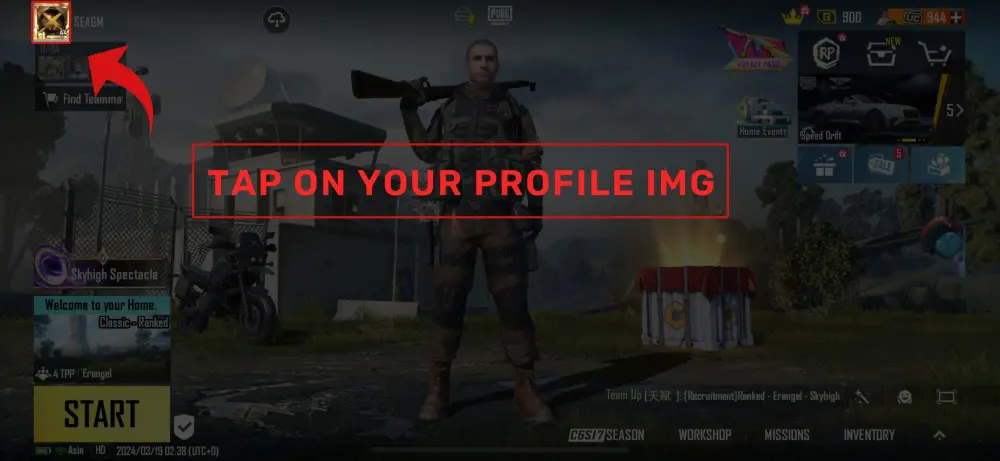
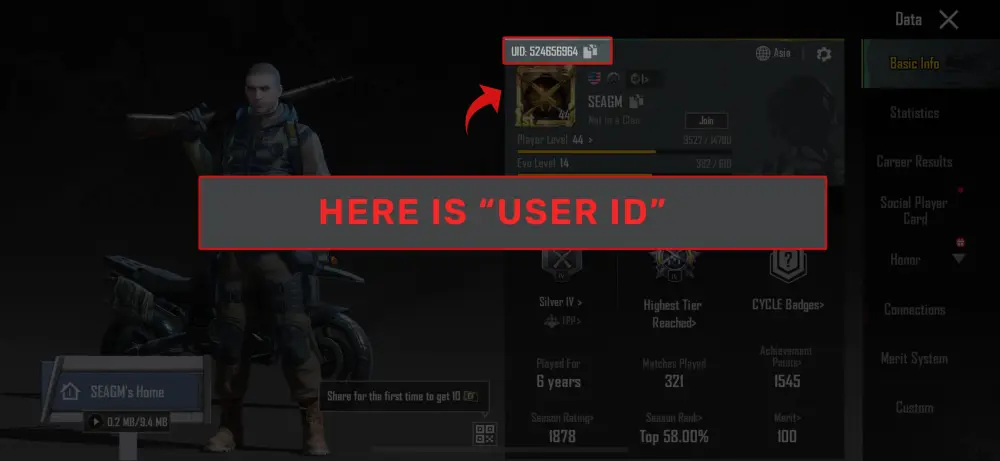
How to find PUBG Mobile Player ID?
- Use your account to log into the game.
- Open your player profile.
- Your PUBG Mobile Player ID will be displayed.
Video Tutorial: How to Top Up PUBG Mobile UC (Global) on SEAGM
In this quick video tutorial, we’ll show you exactly how to top up your PUBG Mobile UC for the Global region via SEAGM. It's fast, secure, and credits instantly to your account.
Ulasan pengguna yang memiliki komentar
Semua Ulasan
Total Ulasan4M
Rata-rata Penilaian4.99

U260309417703
ممتاز
2026/10/26
Ordered codes/id uc can take some time to arrive, but usually that depends on your payment method. PayPal has been working the quickest for me. Also sometimes the code doesn't work from the first try, but I think that's due to midasbuy sometimes being overloaded. Overall good place to purchase UC for good prices
U260902831856
ممتاز
2026/10/03
بعد ما وصل شي
SuminGurung
ممتاز
2026/09/25
Excellent thanks
SuminGurung
ممتاز
2026/09/22
Excellent

U260913433413
ممتاز
2026/09/19
I got my UC Seagm is amazing
SuminGurung
ممتاز
2026/09/15
Recently started using SEAGM and really loved it and will be using now on. You should give it a try too.