
รายละเอียด
แนะนำ
How to top-up PUBG Mobile UC Malaysia?
- Select the Unknown Cash UC denomination.
- Enter your PUBG Mobile Player ID.
- Check out and select your payment method.
- Once payment made, the PUBG Mobile UC you purchased will be credited to your PUBG Mobile Account shortly.
Important Information:
- Only Player ID required for PUBG Mobile UC top-up.
- You may stay logged in throughout the transaction, once the top-up is completed, you will receive the UC in your PUBG Mobile account.
- Please enter your Player ID correctly to avoid delay on receiving your UC.
- This service is ONLY for PUBG Mobile users registered in Malaysia.
- Players only entitle to purchase PUBG Mobile Royale Pass Pack and Elite Pass Plus once per season. Once Royale Pass Pack has been activated, players can't upgrade to Elite Pass Plus.
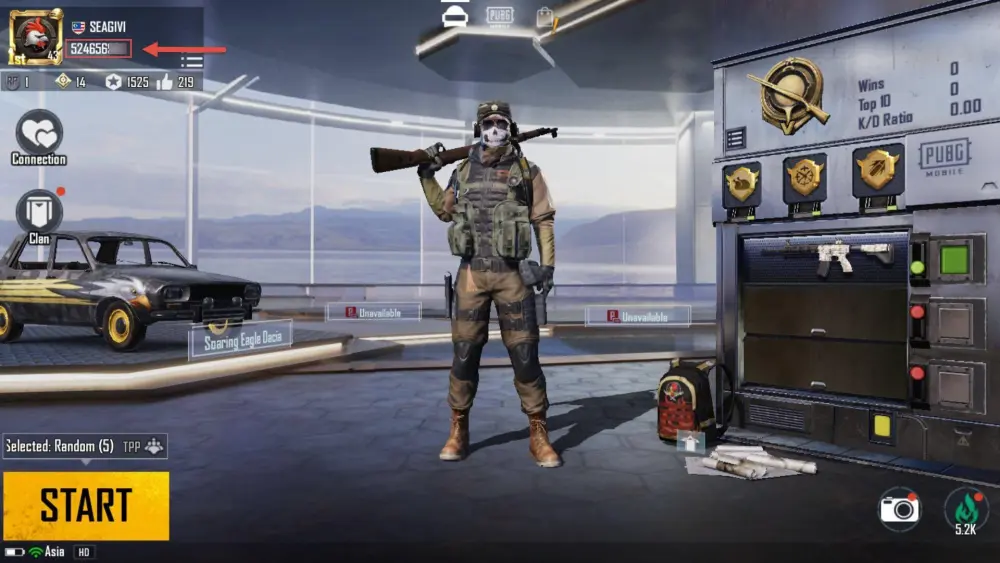
How to find PUBG M Player ID?
- Use your account to log into the game.
- Open your player profile.
- Your PUBG Mobile Player ID will be displayed.
Video Tutorial: How to Top Up PUBG Mobile UC (MY) on SEAGM
In this quick video tutorial, we’ll show you exactly how to top up your PUBG Mobile UC for the Malaysia region via SEAGM. It's fast, secure, and credits instantly to your account.
รีวิวของผู้ใช้ที่มีความคิดเห็น
รีวิวทั้งหมด
รีวิวทั้งหมด1M
คะแนนเฉลี่ย4.99

BLACKHITOO
Excellent
2026/10/21
Terbaik cepat Dan pantas

U260804329967
Excellent
2026/08/13
Very fast
U260522635258
Excellent
2026/07/19
fast !
Mhar93
Excellent
2026/07/09
good . tq

kamalpakhrin091619860215
Excellent
2026/07/03
Good
Amyui97
Excellent
2026/05/31
Fast process, good job.