How to create a Razer Gold Payment Link?
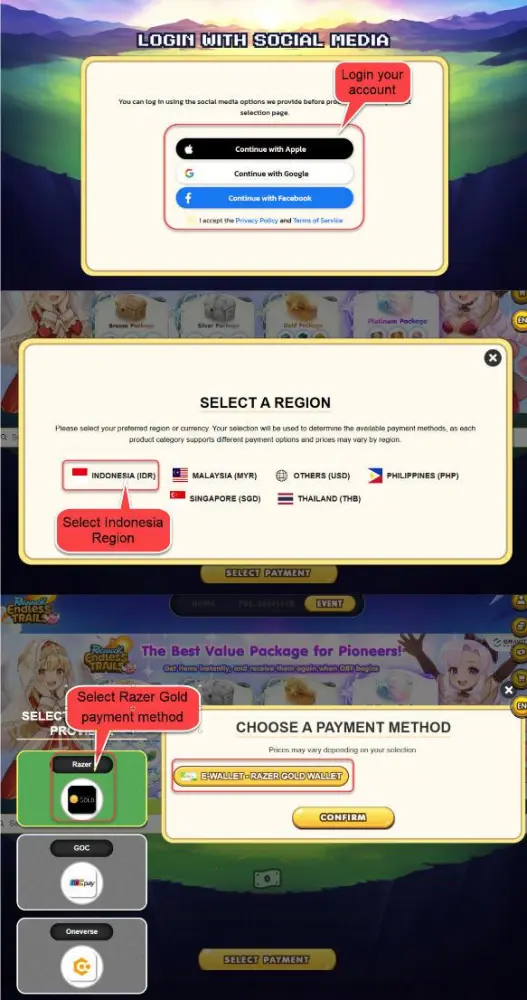
Login to Ragnarok Endless Trails
- Go to the Ragnarok Endless Trails Webshop site: Ragnarok Endless Trails Webshop site.
- Login with your Ragnarok Endless Trails Account.
- Once logged in, select Indonesia Region.
- Under Payment Method, select Razer Gold Wallet.
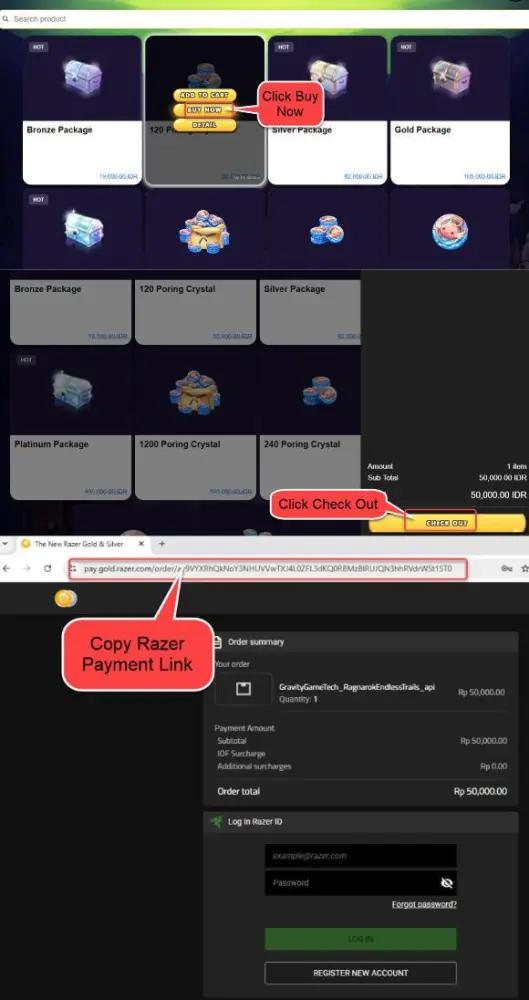
Select Your Denomination or Package:
- Choose the denomination or packages you wish to purchase for your character.
- After selecting the denomination, click "Buy Now", then click "Checkout".
Copy Razer Gold Payment Link:
- Upon confirmation, a Razer Gold payment site will likely pop up in a new window.
- Copy the payment link provided by Razer Gold. It typically starts with
"https://pay.gold.razer.com/order/...." and may include an authentication code.
Please Provide Links Carefully:
- It's important to understand that any inaccuracies in the provided link may lead to payment errors.
- Kindly remind that we will not take responsibility for issues arising from incorrect links.
- The Razer Gold Payment link is only valid for 10 minutes and will expire after that time.
Make sure to follow these steps carefully to complete the recharge process for your Ragnarok Endless Trails character.